The Role of Custom Revit Families in Streamlining Large BIM Projects
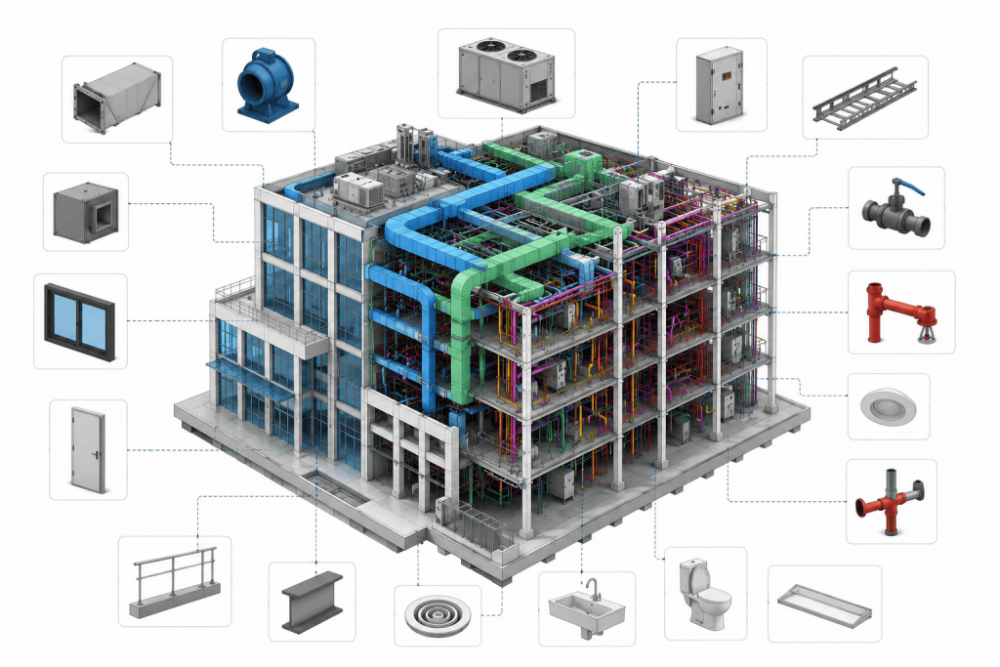
Large BIM projects generate enormous coordination pressure. Hundreds of engineers share the same model. Every inconsistent component ripples through schedules, clash reports, and handover packages across the entire team.
Custom Revit families address that pressure at the source. They deliver precise, parametric, highly detailed components that match what each project demands. This post covers how they transform large-scale BIM delivery from design through facility handover.
What Are Custom Revit Families?
Revit organizes building content into three categories. System families such as walls, floors, and roofs live inside the project file. Loadable families are external files that teams bring into projects. In-place families handle unique, site-specific geometry within a single model.
A custom family goes beyond the generic defaults Revit ships with. A BIM engineer builds it from scratch to match a real product, spatial constraint, or data requirement. The result carries project-specific geometry, shared parameters, and behavior the project team defines.
Why Standard Libraries Fall Short
Autodesk default content covers common conditions. Manufacturer-supplied content covers specific products. Each does not meet the requirements of a large, multidiscipline project.
Generic families carry inconsistent parameter sets. One team’s window family tracks thermal transmittance. Another team’s family omits it entirely. The result is a schedule full of gaps. Standard content also resists the company standards large firms spend years refining, such as naming conventions, LOD thresholds, and parameter structures, all of which require custom development.
How Custom Families Improve Large BIM Projects
Custom families touch every phase where large BIM projects lose time and accuracy. The gains accumulate from modeling through handover.
Standardizing Modeling Across Teams
When every modeler places the same custom door family, the door schedule populates automatically. Fire rating, acoustic rating, hardware set, and frame material all appear in every row. Custom families carry parameter templates that define what data each component must hold, what that data is called, and how it formats. Teams across all disciplines model from identical standards.
Accelerating Design and Documentation
Parametric custom families carry embedded intelligence. A single family represents twenty product sizes through type parameters. A modeler places one family and selects the correct type from a dropdown. Documentation follows immediately.
According to research, BIM adoption shortens project timelines by up to 20% and cuts costs by as much as 15%. Custom families sit at the center of that gain. They reduce the manual effort that generic content requires at every phase.
Improving Coordination and Clash Detection
Clash detection works accurately when families carry correct geometry. A generic pipe fitting with approximate bounding box geometry produces false clashes. When a custom fitting has actual flanged connection geometry, it produces actionable results.
Custom MEP families carry connector geometry that matches fabrication drawings. Structural families carry accurate web and flange profiles. Every discipline places geometry that represents the actual condition. Coordination software reads it precisely. Engineers spend time resolving real conflicts rather than filtering out artifacts.
Reducing Rework and Modeling Errors
Every hour a modeler spends recreating a component that already exists on the project is waste. Custom family libraries stop that waste. One engineer builds the family correctly once. Every other engineer uses the family from the library.
Shared parameters eliminate the inconsistency that drives rework at the documentation stage. Industry reports that 82% of BIM users record a positive return on investment from their BIM programs. Custom families eliminate the modeling decisions that create variance across large teams.
Professional Revit Family Creation Services give project teams parametric families built to project standards from day one.
Supporting Schedules and Facility Management
Schedules drive procurement, hardware coordination, and FF&E specifications. A custom mechanical unit family holds manufacturer, model number, electrical load, weight, and service clearance. The schedule pulls all those values with zero manual entry after placement.
That accuracy also serves facility management. A team that receives a model populated with custom MEP families gets a direct digital asset inventory. They load it into a CMMS system and begin managing the building immediately. Digital twin platforms consume the same data and produce a handover package as a natural output of the workflow.
Each of these gains compounds. A well-built family delivers value from the first placement through the final asset handover.
Best Practices for Custom Family Library Management
A custom family library produces value only when it runs on clear standards and governance.
Set project-wide standards first
Family standards define parameter naming, LOD requirements, file naming rules, and category assignments. Every BIM engineer on the project references the same document. BIM Modeling Services teams map client parameter templates to family structures before the first family enters production.
Keep families lightweight:
A family carrying every product configuration in one file grows heavy. Type parameters handle product variation. 2D detail components manage complex surface patterns. Subcategory assignment controls visibility so each discipline sees only what it needs.
Use shared parameters on every project:
A shared parameter file defines parameter identity across the model. Every parameter carries the same GUID in every family that uses it. Schedules populate correctly regardless of which family placed the value.
Apply quality control before library entry:
Every custom family passes load checks, schedules correctly, and displays accurately across all required view types before any modeler places a single instance. The Revit Family Creation Process at Virtual Building Studio includes senior engineer review at every stage.
Centralized library:
The BIM manager knows exactly which family version went into each project. Version logs answer questions months later, like why a parameter changed, when a geometry update went out; Which teams got it? Access control keeps modifications inside a review process. Every team pulls from the same approved source.
Revit family modeling teams who plan the library before modeling begins give engineers approved content from day one. That decision removes the ad hoc component creation that slows large projects.
Conclusion
Custom Revit families are the structural layer beneath every productive large BIM project. They deliver consistency across disciplines, accuracy in documentation, and asset data that serves owners through the full building lifecycle.
A carefully managed custom family library is a long-term BIM asset. It accelerates every project that draws from it. Revit Family Creation Services USA providers bring the technical depth and library governance discipline that gives project teams a measurable delivery advantage from design through handover.